
7.2 KiB
| layout | title | date | categories | tags | author | image | excerpt | ||||||||||
|---|---|---|---|---|---|---|---|---|---|---|---|---|---|---|---|---|---|
| post | From Bash to Fish: fishing after 15 years | 2025-02-28 04:23 +0000 |
|
|
edu4rdshl |
|
Having the right shell can make a big difference in your productivity. I switched from Bash to Fish after 15 years and I'm loving it. Really loving it. |
Introduction
I've been using Bash for over 15 years. It's THE BEST shell out there. Not by technical merit, but by sheer inertia. It's the default shell on almost every system, every script is written for bash, a lot of systems simply symlink sh to bash, so it's what I've always used and what I've always recommended, it was a very good ride and can't blame bash for absolutely anything.
But things change, more modern alternatives appear, new useful features are added, features that will probably never be added to bash because of compatibility reasons. Time ago, I decided to give Zsh a try, and honestly, it was a disaster. I'm almost sure that it was my fault, I didn't give it enough time, etc; but imo, the Zsh defaults are a mess, not intuitive at all, and therefore not good for someone too used to bash (who is a little nervous to leave the shell he's used for 15 years).
After some time investigating, and seeing that distros like ArchLinux uses Fish as the default shell on the live ISO, I decided to give it a try. And I'm loving it.
Why Fish?
The first thing that I loved about Fish, is how ready-to-use it's out of the box. The default configuration is perfect:
- Auto-suggestions just works.
- Syntax highlighting is there.
- Your bash history is automatically imported.
- A nice plugin system.
- A nice configuration system respecting the XDG Base Directory Specification.
- A nice help system.
Migrating from Bash to Fish
Migrating from Bash to Fish is not hard, but it takes a bit of work if you have a bunch of bash-specific functions, aliases, etc. I had a lot of them, and I had to rewrite all of them. You can use some AI to help you with that (most IAs do a decent job for trivial tasks like it), if you don't want to do it manually. Here's a nice summary on the Fish documentation that will help you to understand the Fish syntax easier: Fish for bash users
I migrated all of my functions and all in about 2 hours, so it isn't that hard.
Installing requirements
We are going to install Fish, Fisher, and oh-my-posh. On ArchLinux, you can install the packages with:
sudo pacman -S fish fisher
Oh-My-Posh is available on the AUR, you can install it with your AUR helper.
paru -S oh-my-posh-bin
Configuration
The Fish configuration is stored in ~/.config/fish/. The main configuration file is ~/.config/fish/config.fish. You can also have a ~/.config/fish/functions/ directory to store your functions, and a ~/.config/fish/completions/ directory to store your completions. There's also a ~/.config/fish/conf.d/ directory to store your drop-in configuration files.
Main configuration file
Here's my ~/.config/fish/config.fish:
{% raw %}
# Disable the greeting, thanks fish
set fish_greeting ""

# Limit history, by default it's 256000 deduplicated entries
set -U fish_history_limit 10000

# Environment variables (Always set)
# Use neovim as the default editor
set -x EDITOR nvim
set -x VISUAL nvim
set -x DOTNET_CLI_TELEMETRY_OPTOUT 1

# Set PATH correctly (Appending user paths after system paths)
set -x PATH $PATH \
            $HOME/.local/bin

# Source aliases (if files exist)
if test -f ~/.config/fish/aliases/aliases.fish
    source ~/.config/fish/aliases/aliases.fish
end

if test -f ~/.config/fish/aliases/private-aliases.fish
    source ~/.config/fish/aliases/private-aliases.fish
end

# Run only in interactive sessions
if status is-interactive
    # Initialize Oh My Posh
    oh-my-posh init fish --config /usr/share/oh-my-posh/themes/easy-term.omp.json | source
end
{% endraw %}
Functions
Here's an example of a function that I use to join Podman containers (docker is also supported, in my case the docker command is an alias to podman):
{% raw %}
function dexec
    set -l container ""
    set -l user "root"
    set -l shell "bash"

    # Parse options
    argparse c= u= s= -- $argv
    or return 1

    if set -q _flag_c
        set container $_flag_c
    end
    if set -q _flag_u
        set user $_flag_u
    end
    if set -q _flag_s
        set shell $_flag_s
    end

    # If no container was specified, list and let the user choose
    if test -z "$container"
        echo "No container specified. Listing running containers..."
        set -l containers (docker ps --format "{{.Names}}")

        if test -z "$containers"
            echo "No running containers found."
            return 1
        end

        echo "Select a container:"
        for i in (seq (count $containers))
            echo "$i) $containers[$i]"
        end

        read -P "Select a container: " container_index
        if test -n "$containers[$container_index]"
            echo "You selected: $containers[$container_index]"
            set container $containers[$container_index]
        else
            echo "Invalid selection."
            return 1
        end
    end

    echo "Executing '$shell' as user '$user' in container '$container'"
    docker exec -u "$user" -it "$container" "$shell"
end
{% endraw %}
Plugins
Fish has a nice plugin system, you can use Fisher to manage your plugins. It's very easy to use, and you can install plugins with a single command. Here's a list of some plugins that I use:
- z: A "smart" cd command that learns your habits. TLRD: you have entered
~/Documents/Projects/Project1several times, you can just typez pro 1and it will take you to~/Documents/Projects/Project1. - bass: A utility that makes it easy to use utilities written for bash in fish shell.
To install them, you can use the following commands:
fisher install jethrokuan/z
fisher install edc/bass
Oh My Posh
As I was doing a shell migration after 15 years, why not change to a cool prompt too? I decided to give Oh My Posh a try. It's a prompt theme engine for any shell: Bash, Zsh, Fish, and even Powershell. Well, it was designed for Powershell, initially. I'm using the easy-term theme. See the Main configuration file section to see how to initialize it.
Results
This is how my terminal looks now:
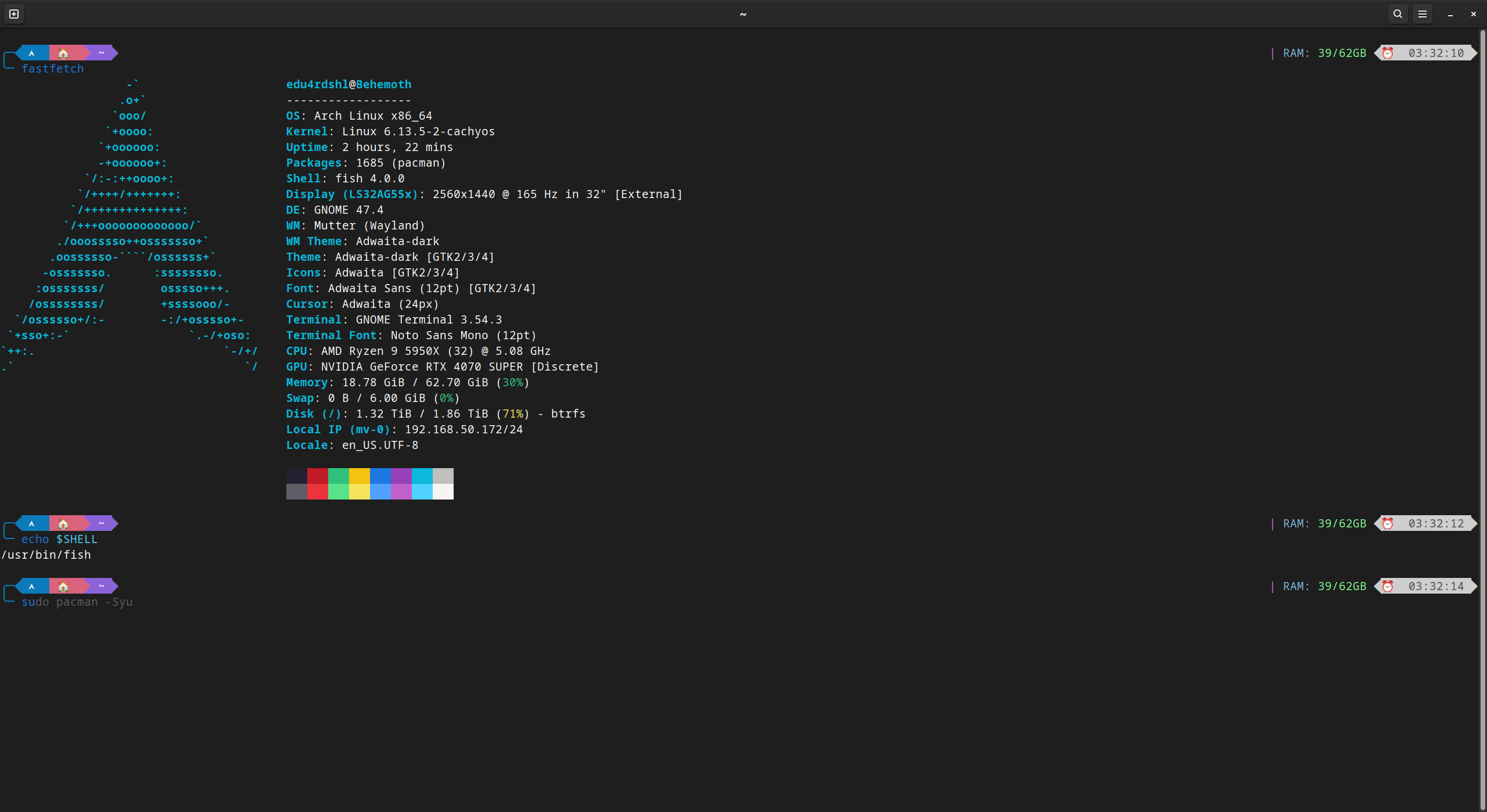
I'm loving Fish, it's a great shell, and I'm happy with my decision to switch. I'm more productive, and I'm having fun with it.
Conclusion
If you're a bash user, I recommend you to give Fish a try. It's a great shell, and you'll probably love it.
Happy fishing!