
9.3 KiB

Strata
A fast, stutter-free clipboard manager for GNOME Shell.
All heavy work (hashing, decoding, storage, search, thumbnails) lives in a Rust daemon. The GNOME Shell extension only renders UI and forwards events over D-Bus, so the compositor is never blocked, even with thousands of items.

Requires a companion daemon. Installing from GNOME Extensions is only half the setup. See Installing the daemon.
The motivation behind this is explained in the technical blog post Rethinking the GNOME clipboard issues
Features
Content types. Strata captures and previews:
- Text (UTF-8). When an app offers both rich and plain text, Strata stores the plain text rather than styled HTML.
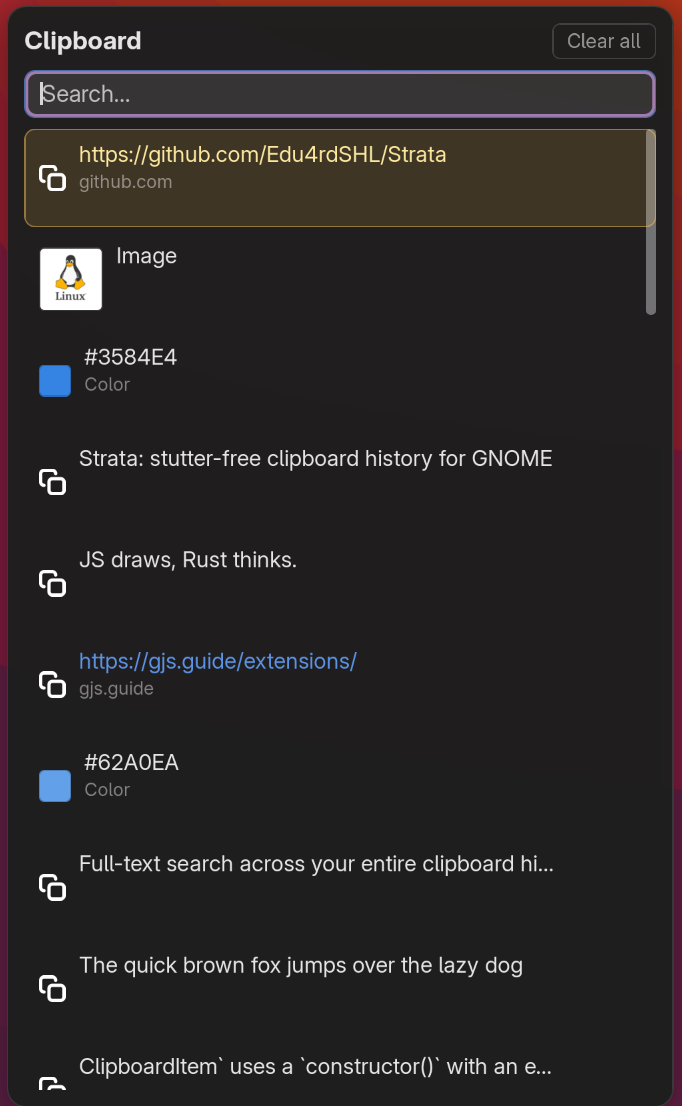
- URLs are shown link-styled, with the hostname as a subtitle.
- Colors: hex values (
#rgb/#rrggbb) get a color swatch. - Images: PNG, JPEG, GIF, WebP, BMP, TIFF, ICO, shown as thumbnails. Decoding and resizing happen once, in the daemon, at copy time.
- Files: file-manager copy/cut (URI lists, e.g. from Nautilus).
Unknown MIME types are ignored (a strict allowlist).
Search.
- Full-text search over the entire stored history, backed by SQLite FTS5.
- Prefix matching, diacritic-insensitive (
cafematchescafé). - Text only; images and binaries are not indexed.
Appearance.
- Light and dark styling follows the GNOME Shell automatically, matching the rest of the shell UI.
- Configurable panel position (top/center/bottom by left/center/right), width, and maximum height.
- Optional "move an item to the top" when you paste it.
Performance.
- All hashing, decoding, storage, search, and thumbnailing run in the Rust daemon, off the compositor's main loop.
- Lazy loading: the panel loads one page of history at a time and fetches more on scroll; thumbnails are fetched on demand and cached on disk; search renders a page at a time. The full table never sits in memory.
- Deduplication: copying the same content twice moves the existing entry to the top (blake3 content hash) instead of adding a duplicate.
Reliability.
- SQLite in WAL mode with atomic upserts; history survives a crash.
- The extension supervises the daemon, respawning it with exponential backoff. Only one daemon runs at a time; a second exits rather than contend for the bus name.
- Configurable history limit (default 200, up to 2000); oldest items are pruned automatically.
Privacy and safety.
- Password-manager aware: entries marked sensitive (the
x-kde-passwordManagerHintused by KeePassXC and others) are never stored. - App exclusions: items copied while a listed app has focus are skipped. The default list covers common password managers (1Password, KeePassXC, Bitwarden, and others).
- Size caps: text and image payloads larger than a configurable limit (1 MB and 5 MB by default) are not stored.
- Never executes clipboard content: no shell exec, no
launch_uri, no markup parsing; paste-back only writes to the clipboard.
Controls.
- Top-bar icon and popup panel, opened with a configurable shortcut (default
Super+Shift+V). - Keyboard navigation (arrow keys,
Escto close), click-outside to dismiss, per-row delete, and "Clear all".
How it looks
A responsive panel that drops down from the top bar and follows the GNOME shell's look.

Architecture
Strata is two components, and you need both for it to work:
| Component | Language | Role |
|---|---|---|
strata-daemon/ |
Rust + tokio + zbus | Storage (SQLite + FTS5), dedup, thumbnails, D-Bus service dev.edu4rdshl.Strata |
strata@edu4rdshl.dev/ |
GJS (GNOME Shell extension) | Top-bar panel, search UI, paste-back, clipboard ingest |
The extension auto-connects to the daemon on enable. If the daemon is managed
by systemd (or another init system), the extension detects it and skips
spawning its own copy. If no daemon is running, the extension looks for
strata-daemon in $PATH and spawns it directly.
GNOME Shell (GJS)  ──D-Bus──▶  strata-daemon  ──▶  SQLite (~/.local/share/strata)
                                       │
                                       └──▶  thumbnails (~/.cache/strata)
Installing the daemon
Strata is two parts: the GNOME Shell extension and a small background daemon
(strata-daemon) that does the storage, search, and thumbnailing. Installing
the extension from GNOME Extensions
is only half the setup; without the daemon the extension does nothing.
Install the daemon with whichever fits your system:
-
Arch (AUR):
paru -S strata-daemon(orstrata-daemon-gitfor the latestmain). -
From source:
git clone https://github.com/Edu4rdSHL/Strata.git
cd Strata
make install-daemon    # builds and installs to ~/.local/bin
Make sure
~/.local/binis in your$PATH.
Then log out and back in (Wayland) or Alt+F2 → r (X11). The extension finds
strata-daemon in $PATH and starts it automatically; no separate service is
needed.
For distro packages and the systemd user service, see Install.
Requirements
- GNOME Shell 50. Older releases may work if built from source but are not tested or supported.
strata-daemonbinary in$PATH(see Install below)- Rust 1.74+ (build only)
glib-compile-schemas(fromglib2-devel/libglib2.0-dev-bin)- SQLite is bundled via
rusqlite, no system dep needed
Install
Arch Linux (AUR)
Strata is split into a daemon package and an extension package; install both. Two channels are available -- pick one channel and don't mix them:
- Stable (tagged releases):
strata-daemon+gnome-shell-extension-strata - Git (latest
main):strata-daemon-git+gnome-shell-extension-strata-git
# Stable
paru -S strata-daemon gnome-shell-extension-strata

# or Git
paru -S strata-daemon-git gnome-shell-extension-strata-git
(Use your AUR helper of choice, e.g. yay instead of paru.) Then log out /
log back in (Wayland) or Alt+F2 → r (X11) and enable:
gnome-extensions enable strata@edu4rdshl.dev
The daemon is installed to /usr/bin/strata-daemon (already in $PATH), so
the extension finds it automatically.
From source (local build)
git clone https://github.com/Edu4rdSHL/Strata.git
cd Strata

# Build and install the daemon binary to ~/.local/bin
make install-daemon

# Install the GNOME Shell extension
make install
Make sure ~/.local/bin is in your $PATH, then log out / log back in
(Wayland) or Alt+F2 → r (X11) and enable:
gnome-extensions enable strata@edu4rdshl.dev
Via systemd user service (distro packages / manual)
Distro packages install the daemon binary to /usr/bin/strata-daemon and
the systemd unit from contrib/systemd/strata-daemon.service to
/usr/lib/systemd/user/. Enable it once:
systemctl --user enable --now strata-daemon
Then install and enable the extension as above. The extension detects the running daemon and will not spawn a second copy.
Pack for extensions.gnome.org
make pack # produces strata@edu4rdshl.dev.shell-extension.zip (JS only)
Uninstall
gnome-extensions disable strata@edu4rdshl.dev
rm -rf ~/.local/share/gnome-shell/extensions/strata@edu4rdshl.dev
rm -rf ~/.local/share/strata ~/.cache/strata    # also wipes history
Other desktops?
The daemon is desktop-agnostic. It speaks plain D-Bus and runs anywhere
the session bus does. Any client (KDE applet, CLI tool, your own script)
can drive it. See strata-daemon/README.md for
the wire protocol and a busctl example.
The shipped UI is a GNOME Shell extension. Ports to other desktops only need a new front-end against the same D-Bus interface.
Deeper reading
ARCHITECTURE.md: design goals, process model, storage schema, FTS5 details, concurrency, security boundary.strata-daemon/README.md: D-Bus interface reference and standalone usage.strata@edu4rdshl.dev/README.md: extension internals.
AI Policy Disclosure
Parts of this codebase and documentation were written with the assistance of AI tools. This is the policy we follow and will continue to follow: every line of code and every document produced with AI assistance is rigorously reviewed by a human before being published. No AI-generated output is committed without understanding, verification, and approval by the project author.
License
GPL-3.0-or-later.